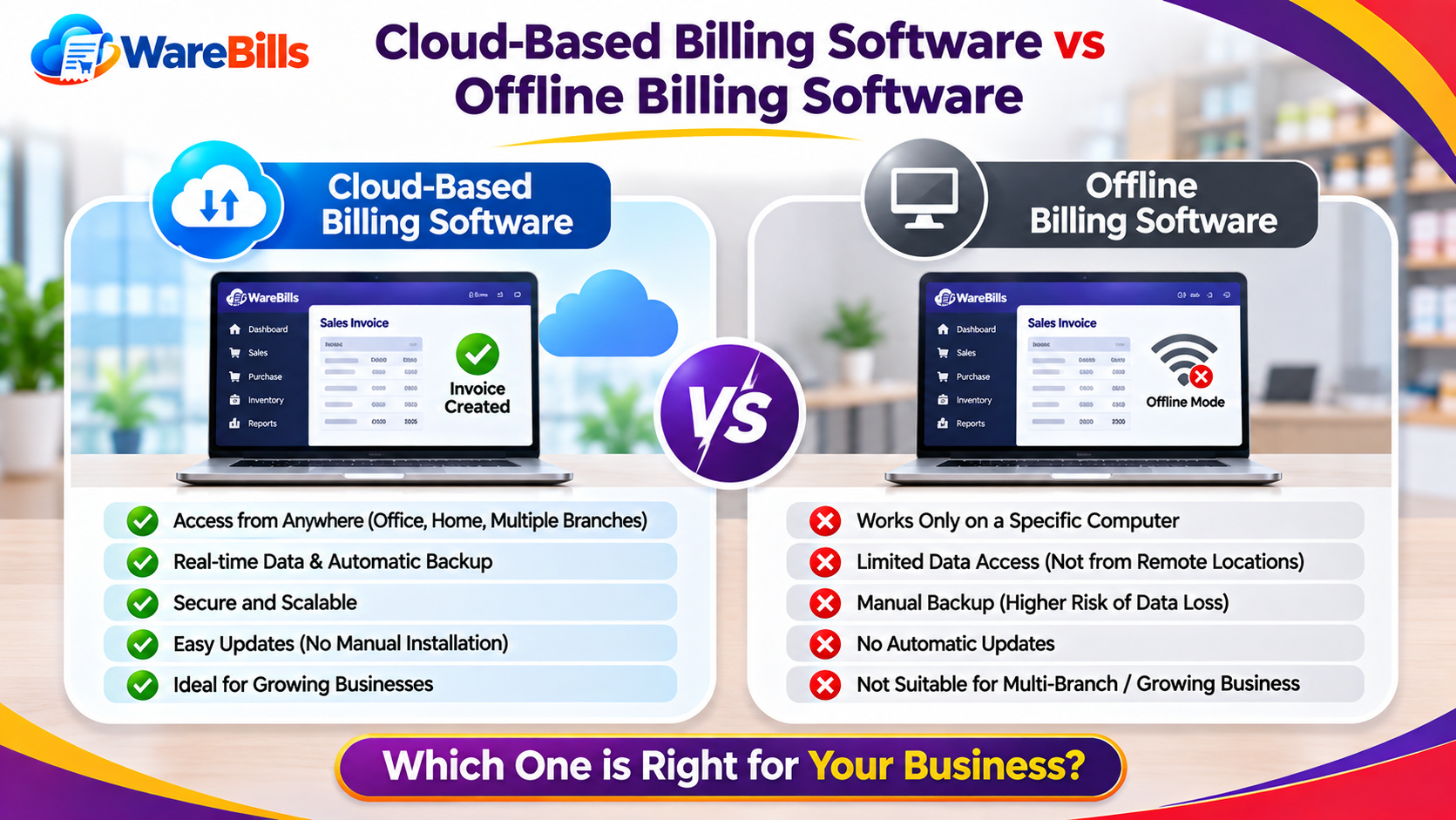
One of the first decisions is whether to use cloud-based billing software or offline billing software.
Cloud-based software generally stores and processes business data through internet-connected services, while traditional offline software is designed to operate locally on a computer. However, some products combine both approaches, so the actual capabilities depend on the software.
In this guide, we will compare cloud-based and offline billing software to help you decide which option suits your business requirements.
What Is Cloud-Based Billing Software?
Cloud-based billing software runs through cloud-hosted services and is commonly accessed using a web browser or an application connected to the internet.
Business records are stored or processed using the provider's infrastructure, depending on the product's design. This can make it easier for authorised users to access information from different locations.
Common characteristics may include:
- Access through a browser or supported application
- Centralised business records
- Access for multiple authorised users
- Online data synchronisation
- Provider-managed updates
- Cloud backup options, depending on the service
- Integration with other business tools, where supported
For example, a distributor with a sales office and a warehouse may prefer a cloud-based solution if authorised staff need to access shared billing and stock information from both locations.
Before selecting a product, check its supported devices, access controls, backup policy and internet requirements.
What Is Offline Billing Software?
Offline billing software is designed to perform billing operations locally on a computer or other device without requiring a continuous internet connection for its core functions.
Depending on the software, business data may be stored on the local device or on a local network server.
Common characteristics may include:
- Local access to billing records
- Core billing operations without continuous internet connectivity
- Data storage on a computer or local server
- Updates installed manually or through a supported update mechanism
- Local backup options
- Network access for multiple users, if supported and configured
For example, a retail shop in an area with an unreliable internet connection may prefer offline billing software if it needs to continue generating invoices during connectivity interruptions.
Offline software still requires proper backups, security controls and maintenance. A computer failure or damaged storage device can cause serious data loss if the business has no reliable backup.
Cloud-Based vs Offline Billing Software: Key Differences
Neither option is automatically better for every business. The right choice depends on connectivity, working arrangements, security requirements and the software's actual capabilities.
Advantages of Cloud-Based Billing Software
1. Access Business Records From Different Locations
Cloud-based solutions can allow authorised users to access business information from different locations using supported devices and an internet connection.
This can be useful for business owners who manage a shop, warehouse and office or need to review sales records while travelling.
2. Centralised Information
When the software supports shared records, sales and purchasing information can be maintained in one central system. This can reduce the need to transfer files manually between computers.
Businesses should still verify how quickly information synchronises and how conflicts between simultaneous changes are handled.
3. Easier Software Maintenance
Some cloud-based products receive updates directly from the provider. This can reduce the amount of manual installation and maintenance required from the business.
Check whether updates are automatic, whether downtime is expected and whether changes affect existing workflows.
4. Backup and Recovery Options
Some cloud providers offer automated backups and recovery mechanisms. These can help businesses recover information after accidental deletion or technical problems.
Do not assume every cloud service includes comprehensive backups. Review backup frequency, retention periods, export options and recovery procedures before subscribing.
5. Support for Business Growth
A suitable cloud solution may make it easier to extend access to additional users or locations, depending on the subscription and product limits.
For expanding businesses, compare user limits, branch support, permissions and any additional charges.
Advantages of Offline Billing Software
1. Billing Without Continuous Internet Access
Offline billing software can be useful for businesses operating in locations where internet connectivity is unreliable.
If the software is genuinely designed to work offline, staff may continue generating invoices and maintaining local records during an internet outage.
2. Local Data Control
With locally stored data, the business has direct control over the computer or server holding its records. This can suit businesses with specific local infrastructure or operational requirements.
However, local storage does not automatically mean better security. Device protection, access permissions and backup procedures remain essential.
3. Reduced Dependence on Cloud Availability
Core billing functions may continue working when a cloud provider experiences an outage, provided the software operates locally and does not require online authentication or other cloud services.
Check the exact offline capabilities rather than relying only on the word “offline” in a product description.
4. Predictable Local Workflow
Businesses with one computer or a small local network may find a locally installed application straightforward to use.
The total cost should still account for installation, maintenance, hardware replacement, updates and data backups.
Which Option Is Better for Retail Shops and Wholesalers?
The best option depends on how your business operates.
A cloud-based solution may be suitable if:
- You need access to billing information from multiple locations.
- Several authorised users work with shared business records.
- You want provider-managed updates where available.
- You need online reporting and integrations.
- Your internet connection is generally reliable.
An offline solution may be suitable if:
- Your business regularly experiences internet interruptions.
- Billing must continue locally during outages.
- Most work happens on a single computer or local network.
- You prefer local data storage and can manage backups.
- Your required billing functions do not depend on online services.
A retailer with one shop and stable internet may choose cloud software for convenient access. Another retailer with frequent connectivity problems may prioritise offline billing. A wholesaler with multiple branches may place greater importance on shared records and centralised access.
Evaluate your daily workflow before making a decision.
What About Hybrid Billing Software?
Some billing solutions combine cloud and offline capabilities. A hybrid system may allow users to continue selected operations locally and synchronise records when the internet connection returns.
However, offline capability varies considerably between products. Some applications only allow limited access to previously downloaded information, while others support local invoice creation and later synchronisation.
Before choosing a hybrid solution, ask:
- Can invoices be created during an internet outage?
- Are new sales and stock changes stored locally?
- How are offline transactions synchronised?
- What happens if the same stock is sold at two locations?
- Are reports available while offline?
- Can the business back up and export its data?
These questions are especially important for shops that cannot afford to stop billing during connectivity problems.
Factors to Consider Before Choosing Billing Software
1. Internet Reliability
Review how frequently your business experiences connectivity issues and whether billing must continue during an outage.
2. Business Size and Number of Locations
Consider the number of users, branches, warehouses and devices that need access to the same records.
If you sell many products, check whether the software supports your required stock tracking, purchase records, returns and stock adjustments.
4. Data Backup and Recovery
Understand where data is stored, how frequently it is backed up and how quickly it can be recovered after a failure.
5. Security and User Permissions
Look for suitable user roles, access controls, authentication methods and data protection practices.
6. Total Cost of Ownership
Compare subscription charges, installation costs, maintenance, hardware, backup expenses and additional user or branch fees. A low initial price does not necessarily mean a lower long-term cost.
7. Support and Data Export
Check the availability of technical support, the process for resolving problems and whether you can export your business records in a usable format.
How WareBills Fits Into Your Evaluation
If you are considering WareBills for your retail or wholesale business, evaluate its available billing, inventory and reporting capabilities against your requirements.
Confirm whether the product's current setup supports your preferred access method, internet availability, number of users, backup expectations and branch workflow.
Rather than choosing software based only on whether it is cloud-based or offline, test the key tasks your business performs every day, including creating invoices, recording purchases, handling returns and reviewing stock.
A short trial using realistic business scenarios can help you identify limitations before committing to a solution.
Conclusion
Cloud-based and offline billing software serve different operational needs. Cloud-based solutions can offer convenient remote access and centralised records, while offline solutions can help businesses continue core billing activities without continuous internet connectivity.
The right choice depends on your internet reliability, business locations, data management preferences, budget and required features. Some businesses may also benefit from a hybrid solution that supports selected offline operations.
Compare the total cost, test essential workflows and review backup and security arrangements before making a final decision. The goal is to choose billing software that supports accurate records and reliable daily operations as your business grows.